
Building a Star Wars App with SwiftUI + Combine (Part 1)
Build a Complete App from Scratch using SwiftIU & Combine.
We’ll cover SwiftUI with MVVM, Unit Tests and Async/Await and Dependency Injection
In this post, we will explore how to build a SwiftUI app that fetches and displays Star Wars information obtained from Swapi.tech API.s
This is a Work in Progress project that demonstrates the use of modern Swift development principles, including async/await for networking, the use of Dependency Injection with the use of the concept of Composition Root, local asset management, Unit Tests strategies, the MVVM UI Design Pattern and also shows clean ways of communicating changes to the team with small commits and clear messages.
The idea is to start small, as simple as possible and start building on this. After this initial post I’ll be adding new ones with the improvements.
Note: Combine implementation will be taking place in the second post. See how the refactoring goes!
Get the repo!
I’ll be adding commits daily so stay tuned! Here is the Github repo: https://github.com/FeRHeDio/Swapi-demo
What you need to build this?
Just clone the repo and you’re ready to go, no external dependencies , no cocoapods nor SPM libraries (at least for now 🙂)
Project Structure
Quick look
SwapiDemoApp
├── Models
│   ├── People.swift
│   ├── PeopleResponse.swift
├── ViewModels
│   ├── CharactersViewModel.swift
├── Views
│   ├── CharactersView.swift
│   ├── CharacterDetailsView.swift
│   ├── CharacterView.swift
├── API
│   ├── API.swift
├── Tests
│   ├── SwapiDemoTests.swift
└── App
    ├── SwapiDemoApp.swift
Let’s get started
The Characters List View
At a glance we have the first of the features: the CharactersList, with a CharacterView to handle each individual character.
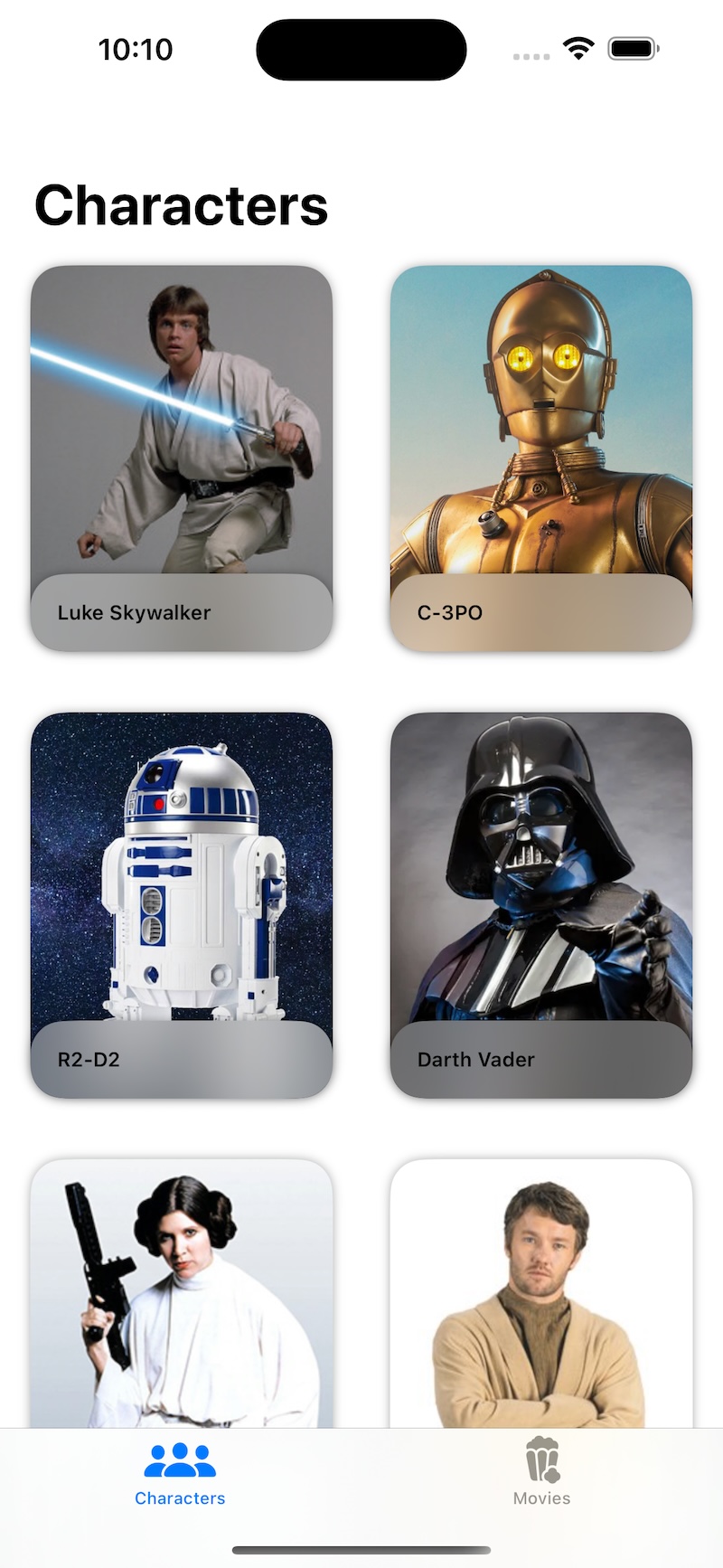
For now the App is showing only the first 10 characters in the first tab Characters
Features of the App
Fetching Data with Async/Await
We use Swift’s modern async/await feature to make clean and readable network requests to the Swapi.tech API. The APIclass handles all networking logic and ensures error handling which we’re going to extend with our own types in future sessions.
The API class
class API {
    private var session: URLSession

    let baseURL = "https://swapi.tech/api/people"

    init(session: URLSession = .shared) {
        self.session = session
    }

    func getPeople() async throws -> [People] {
        guard let url = URL(string: baseURL) else {
            throw URLError(.badURL)
        }

        let (data, response) = try await session.data(from: url)

        guard let httpResponse = response as? HTTPURLResponse, httpResponse.statusCode == 200 else {
            throw URLError(.badServerResponse)
        }

        let peopleResponse = try JSONDecoder().decode(PeopleResponse.self, from: data)

        return peopleResponse.results
    }
}
With this setup, fetching data becomes straightforward and manageable.
We’ll use the MVVM Architecture
The app is designed using the MVVM (Model-View-ViewModel) architecture.
This separates business logic, data handling, and UI, making the app scalable and testable.
The ViewModel class
@Observable
class CharactersViewModel {
    enum LoadingState {
        case loading
        case loaded(characters: [People])
        case error
    }

    var peopleList = [People]()
    let api: API?
    var state = LoadingState.loading
    var useMockData: Bool

    init(peopleList: [People] = [People](), api: API? = nil, useMockData: Bool = false) {
        self.peopleList = peopleList
        self.api = api
        self.useMockData = useMockData
    }

    func getData() async {
        if useMockData {
            state = .loaded(characters: People.mockData())
        } else {
            state = .loading
            do {
                if let api {
                    state = .loaded(characters: try await api.getPeople())
                }
            } catch {
                state = .error
            }
        }
    }
}
The LoadingState enum manages UI transitions between loading, loaded, and error states.
As you can see here I use the The @Observable Macro: A New Way to Track Changes to Data in SwiftUI to handle data changes.
Local Image Management
The API doesn’t provide images.
So I took the work of getting each of the images by hand (yeah thank me).
Character images are stored locally in the app’s Assets Catalog.
Each image is named using the character’s unique ID (uid). If a character does not have a corresponding image, a default fallback image is used.
Local Image Handling example
struct People: Codable, Identifiable {
    var id: String { uid }
    let uid: String
    let name: String
    let url: String
    var imageName: String {
        return UIImage(named: uid) != nil ? uid : "placeholder"
    }
}
Mocked Data for Previews
Mock data ensures that SwiftUI previews work seamlessly without depending on live API responses.
This enables rapid UI prototyping and testing.
Mock Data Example
extension People {
    static func mockData() -> [People] {
        return [
            People(uid: "1", name: "Luke Skywalker", url: "https://www.swapi.tech/api/people/1"),
            People(uid: "2", name: "C-3PO", url: "<https://www.swapi.tech/api/people/2"),
            People(uid: "3", name: "R2-D2", url: "<https://www.swapi.tech/api/people/3"),
            People(uid: "4", name: "Darth Vader", url: "https://www.swapi.tech/api/people/4"),
            People(uid: "5", name: "Leia Organa", url: "https://www.swapi.tech/api/people/5"),
            People(uid: "6", name: "Padme Amidala", url: "https://www.swapi.tech/api/people/6")
        ]
    }
}
Fallback Strategies for Missing Images
The app dynamically checks if an image exists in the Assets Catalog. If no image is found, a default placeholder image is displayed.
Fallback Logic Example:
var imageName: String {
    return UIImage(named: uid) != nil ? uid : "placeholder"
}
This ensures a smooth user experience, even if some characters lack images.
SwiftUI views
CharactersView & CharacterView
The app uses modern SwiftUI components for an intuitive and responsive user interface.
Each character is displayed in a scrollable list, with details available via a navigation and a modal view.
The project includes CharacterDetailsView but it’s only used to display the name of the character presented by CharactersView in a modal view → We’ll tapping into this file to present a nice detail of each character.
CharactersView – The Main list of characters.
struct CharactersView: View {
    let charactersViewModel: CharactersViewModel
    var columns = [GridItem(.adaptive(minimum: 160), spacing: 10)]
    @State private var selectedCharacter: People? = nil

    var body: some View {
        NavigationStack {
            Group {
                switch charactersViewModel.state {
                case .loading:
                    ProgressView()
                case .error:
                    Text("An error ocurred")
                case .loaded(let characters):
                    ScrollView(showsIndicators: false) {
                        LazyVGrid(columns: columns, spacing: 20) {
                            ForEach(characters) { chad in
                                CharacterView(character: chad)
                                    .onTapGesture {
                                        selectedCharacter = chad
                                    }
                                    .padding(.vertical, 8)
                            }
                        }
                    }
                    .padding(.horizontal, 6)
                }
            }
            .navigationTitle("Characters")
            .sheet(item: $selectedCharacter, content: { chad in
                CharacterDetailsView(character: chad)
            })
        }
        .task {
            await charactersViewModel.getData()
        }
    }
}

#Preview {
    CharactersView(
        charactersViewModel: CharactersViewModel(
            useMockData: true
        )
    )
}
CharacterView – Individual Character view.
Here we add details for each of the characters, and of course with it’s own preview.
struct CharacterView: View {
    let character: People

    var body: some View {
        ZStack(alignment: .bottom) {
            Image(character.imageName)
                .resizable()
                .scaledToFit()
                .cornerRadius(20)
                .frame(width: 180)

            VStack(alignment: .leading) {
                Text(character.name)
                    .font(.caption)
                    .bold()
            }
            .padding()
            .frame(width: 180, alignment: .leading)
            .background(.ultraThinMaterial)
            .cornerRadius(20)
        }
        .shadow(radius: 3)
    }
}

#Preview {
    CharacterView(
        character: People(
            uid: "1",
            name: "Luke Skywalker",
            url: "<https://www.swapi.tech/api/people/1>"
        )
    )
}
Unit Tests
With Mocking
The project includes unit tests for API responses and fallback logic, ensuring robustness and reliability.
We’ll create a URLSessionMock to intercept network calls before they hit the netowrk.
This can be a whole post in itself, but let’s cover it quickly.
Test cases
There is a lot of tests to add here but for now we’ll cover the Network Layer.
The cases are:
api success
api badURL
api badServerResponse
api badHTTPServerResponse
Change the scheme to SwapiDemoTests, hit CMD+U and see the tests passing.
We’re going to give a lot of importance to the tests so this will grow as we progress.
Our Unit Test class
final class SwapiDemoTests: XCTestCase {
    func test_API_getPeopleSucceed() async throws {
        let sut = makeSUT()
        let url = "<https://swapi.tech/api/people>"
        let response = HTTPURLResponse(
            url: URL(string: url)!,
            statusCode: 200,
            httpVersion: nil,
            headerFields: nil
        )

        let sampleData = try! JSONEncoder().encode(makePeopleReponseMock())

        URLSessionMock.mockResponse = (sampleData, response, nil)

        let peopleList = try await sut.getPeople()

        XCTAssertEqual(peopleList.count, 2, "Expected count 2, received: \\(peopleList.count)")
    }

    func test_API_returnsBadURLError() async {
        let wrongURL = "someBadURL"
        let sut = makeSUT(url: wrongURL)

        do {
            _ = try await sut.getPeople()
            assertionFailure("Shouldn't succeed")
        } catch {
            XCTAssertEqual(error as? URLError, URLError(.badURL))
        }
    }

    func test_API_returnsBadResponseError() async {
        let sut = makeSUT()
        let url = "<https://swapi.tech/api/people>"

        let response = HTTPURLResponse(
            url: URL(string: url)!,
            statusCode: 300,
            httpVersion: nil,
            headerFields: nil
        )

        URLSessionMock.mockResponse = (nil, response, nil)

        do {
            _ = try await sut.getPeople()
        } catch {
            XCTAssertEqual(error as? URLError, URLError(.badServerResponse))
        }
    }

    func test_API_returnsBadHTTPResponse() async {
        let sut = makeSUT()
        let url = "<https://swapi.tech/api/people>"

        let response = URLResponse(
            url: URL(string: url)!,
            mimeType: nil,
            expectedContentLength: 0,
            textEncodingName: nil
        )

        URLSessionMock.mockResponse = (nil, response, nil)

        do {
            _ = try await sut.getPeople()
        } catch {
            XCTAssertEqual(error as? URLError, URLError(.badServerResponse))
        }
    }

    // MARK: - Helpers

    private func makeSUT(url: String = "<https://swapi.tech/api/people>") -> API {
        let config = URLSessionConfiguration.ephemeral
        config.protocolClasses = [URLSessionMock.self]
        let mockSession = URLSession(configuration: config)

        return API(session: mockSession, baseURL: url)
    }

    private func makePeopleReponseMock() -> PeopleResponse {
        PeopleResponse(
            message: "ok",
            records: 2,
            pages: 1,
            results: [
                People(
                    uid: "1",
                    name: "Luke Skywalker",
                    url: "<https://swapi.tech/api/people/1>"
                ),
                People(
                    uid: "2",
                    name: "Darth Vader",
                    url: "<https://swapi.tech/api/people/2>"
                ),
            ]
        )
    }
}
URLSessionMock for testing
This Mock class uses URLProtocol to intercept network calls as you can see in the unit tests.
private class URLSessionMock: URLProtocol {
    static var mockResponse: (Data?, URLResponse?, Error?)?

    override class func canInit(with request: URLRequest) -> Bool {
        true
    }

    override class func canonicalRequest(for request: URLRequest) -> URLRequest {
        request
    }

    override func startLoading() {
        if let (data, response, error) = URLSessionMock.mockResponse {
            if let data = data {
                client?.urlProtocol(self, didLoad: data)
            }
            if let response = response {
                client?.urlProtocol(self, didReceive: response, cacheStoragePolicy: .notAllowed)
            }
            if let error = error {
                client?.urlProtocol(self, didFailWithError: error)
            } else {
                client?.urlProtocolDidFinishLoading(self)
            }
        }
    }

    override func stopLoading() {}
}
Composition Root & Dependency injection
Composition Root is not that common along iOS Development but it shows a nice way to inject dependencies.
@main
struct SwapiDemoApp: App {
    let api: API
    let charactersViewModel: CharactersViewModel

    init() {
        let session = URLSession.shared
        self.api = API(session: session)
        self.charactersViewModel = CharactersViewModel(api: api)
    }

    var body: some Scene {
        WindowGroup {
            ContentView(charactersViewModel: charactersViewModel)
        }
    }
}
Next steps
Ok here is the first of a series of posts
The idea for the future is as follows:
- Add pagination to the existing
CharactersView– The API returns 9 pages. - The API also retrieves 82 people so we need to add each image.
- We need to add tests to cover more ground, like testing
CharactersViewModel
After having this initial People Feature we can start to think about other models like Movies Planets and so on.
Conclusion
This project highlights how to build a robust SwiftUI app using modern development practices.
By leveraging the Swapi.tech API, we fetch and display data efficiently while maintaining a smooth user experience with local assets and fallback strategies.
Feel free to clone the project and follow along.
Don’t hesitate to share your thoughts!
Thanks for reading!