Building a Star Wars App with SwiftUI + Combine (Part 2)
A new approach to fetch data: Combine
After dealing with pagination in the current implementation (async/await for the network call) I realize that using Combine not only simplifies a lot everything, but creates a wonderful use case to start using Combine as much as we can, so in this post we reborn it as Building a Star Wars App with SwiftUI & Combine.
Let’s start replacing what we have with Combine.
I created a feature/combine branch so when we are done with this new feature we will do a Pull Request to merge it against main.
async/await nontheless is a wonderful way to deal with asynchronous code.
Check my post for more on async/await
How to simplify your Asynchronous code with Async/Await in Swift
What’s the plan?
We need to do at least 5 things:
- Update the API call
- Update the ViewModel
- Update the View
- Update the Preview
- Update the tests
API Call with Combine
Here is our current API call:
func getPeople() async throws -> [People] {
    do {
        guard let url = URL(string: baseURL), url.scheme != nil, url.host != nil else {
            throw URLError(.badURL)
        }

        let (data, response) = try await session.data(from: url)

        guard let httpResponse = response as? HTTPURLResponse else {
            throw URLError(.badServerResponse )
        }

        guard httpResponse.statusCode == 200 else {
            throw URLError(.badServerResponse)
        }

        let peopleResponse = try JSONDecoder().decode(PeopleResponse.self, from: data)

        return peopleResponse.results

    } catch let error{
        throw error
    }
}
Now we change it to have this
func getPeople() -> AnyPublisher<PeopleResponse, Error> {
    guard let url = URL(string: baseURL) else {
        return Fail(error: URLError(.badURL))
            .eraseToAnyPublisher()
    }

    return session.dataTaskPublisher(for: url)
        .tryMap { data, response in
            guard let httpResponse = response as? HTTPURLResponse,
                  httpResponse.statusCode == 200 else {

                throw URLError(.badServerResponse)
            }

            return data
        }
        .decode(type: PeopleResponse.self, decoder: JSONDecoder())
        .receive(on: DispatchQueue.main)
        .eraseToAnyPublisher()
}
**Import combine** at the top of the file. We should do the imports in alphabetic order? I think we should.
import Combine
import Foundation
Here our new call returns a **Publisher**.
For the error part we also need to return a Publisher now so we use Fail to unwrap our url if an invalid URL comes in.
We are using URL session.dataTaskPublisher(for:) that returns a Publisher.
With .tryMap we check for the response of the server and throw an error that will be handled by the publisher and then return the data if all goes well.
.decode maps our current model to PeopleResponse without any change.
.receive ensures we receive the response in the thread that we want. .main in our case.
.eraseToAnyPublisher exposes our Publisher to be of any kind so we are untied of types when Subscribing.
We are done with te API, now let’s go to update our ViewModel.
Update CharactersViewModel
This is our current implementation:
func getData() async {
    if useMockData {
        state = .loaded(characters: People.mockData())
    } else {
        state = .loading
        do {
            if let api {
                state = .loaded(characters: try await api.getPeople())
            }
        } catch {
            state = .error
        }
    }
}
Change it to this:
func getPeople() {
    if let api {
        api.getPeople()
            .sink(receiveCompletion: { completion in
                switch completion {
                case .finished:
                    print("finished")
                case .failure(_):
                    self.state = .error
                }
            }, receiveValue: { [weak self] val in
                guard let self else { return }

                self.state = .loaded(characters: val.results)
            })
            .store(in: &cancellable)
    }
}
Here in the ViewModel we subscribe to the API publisher with .sink, we receive the completion and switch over it, and also we receive the data and pass the response results to the .loaded state.
We need to store it so we can cancel it, hence the cancellable comes in.
Define this prop in the ViewModel
var cancellable = Set<AnyCancellable>()And lastly we need to call getPeople func in the init
init(peopleList: [People] = [People](), api: API? = nil, useMockData: Bool = false) {
    self.peopleList = peopleList
    self.api = api
    self.useMockData = useMockData
    getPeople()
}
Now, after the creation of the ViewModel getPeople is called, and we are done with the ViewModel.
Let’s move to the list view.
Updating the View
Update CharactersListView
Here we broke our Preview and it is stuck at the .loading state, let’s fix this later, now let’s focus on use our new Combine API call.
We only need to remove the .task line that calls our old function on the viewModel.
// Just remove this .task
.task {
    await charactersViewModel.getData()
}
How cool is that?
Ok great, try to build and run the project.
It works.. and it works faster! (is it or is just me?)
Now, commit the changes and let’s cleanup.
Cleanup
Let’s remove the old code
Remove the old **[async/await](https://www.ferhedio.com/async-await-in-swift-simplifying-asynchronous-code/ "How to simplify your Asynchronous code with Async/Await in Swift")** API calls and all it’s references.
Comment out the part of the test that is complaining.
//        let peopleList = try await sut.getPeople()
//        XCTAssertEqual(peopleList.count, 2, "Expected count 2, received: \\(peopleList.count)")
Let’s fix our Preview now.
Fix the List Preview
Since we have changed our ViewModel implementation we just need add back our conditional to see if we want to consumed the mocked data or not.
Here we change the ViewModel getPeople() implementation to add only the if/else.
func getPeople() {
    if useMockData {
        state = .loaded(characters: People.mockData())
    } else {
        let url = nextPageURL ?? currentPageURL

        if let api {
            api.getPeople(from: url)
                .sink(receiveCompletion: { completion in
                    switch completion {
                    case .finished:
                        print("finished")
                    case .failure(_):
                        self.state = .error
                    }
                }, receiveValue: { [weak self] val in
                    guard let self else { return }

                    self.state = .loaded(characters: val.results)
                })
                .store(in: &cancellable)
        }
    }
}
Go to CharactersView and see the Preview moving away from the loading state, good.
Let’s move on.
Update our Unit Tests
To use our Combine implementation
Update and improve our first test test_API_getPeopleSucceed()
func test_API_getPeopleSucceed() async throws {
    let url = "https://swapi.tech/api/people"
    let sut = makeSUT(url: url)
    let mockResponse = HTTPURLResponse(
        url: URL(string: url)!,
        statusCode: 200,
        httpVersion: nil,
        headerFields: nil
    )

    var cancellable = Set<AnyCancellable>()

    let mockData = try! JSONEncoder().encode(makePeopleReponseMock())

    URLSessionMock.mockResponse = (mockData, mockResponse, nil)

    var peopleList = [People]()
    let exp = XCTestExpectation(description: "wait for it")

    sut.getPeople(from: url)
        .sink { completion in
            if case .failure = completion {
                XCTFail("Expected successful response but received failure")
            }
        } receiveValue: { people in
            peopleList = people.results
            exp.fulfill()
        }
        .store(in: &cancellable)

    wait(for: [exp], timeout: 1.0)

    let expectedResult = 2
    let receivedResult = peopleList.count

    XCTAssertEqual(receivedResult, expectedResult, "Expected count \(expectedResult), received: \(receivedResult) instead")
}
Here we use our mocked implementations of URLSession and inject mock data to it.
Hit CMD+U and see the test pass.
If you have any failing tests comment it out for now and try this one only.
Now let’s go to the unhappy path.
Next we have the test_API_returnsBadURLError case.
Update it to this:
func test_API_returnsBadURLError() async {
    let wrongURL = "bad_url"
    let sut = makeSUT(url: wrongURL)
    var cancellable = Set<AnyCancellable>()

    let exp = XCTestExpectation(description: "wait for it")

    sut.getPeople(from: wrongURL)
        .sink { completion in
            if case .failure(let error) = completion {
                XCTAssertEqual(error as? URLError, URLError(.badURL))
                exp.fulfill()
            } else {
                XCTFail("Shouldn't succeed on a bad url!")
                exp.fulfill()
            }
        } receiveValue: { _ in }
        .store(in: &cancellable)

    wait(for: [exp], timeout: 1.0)
}
Here we care about the error case so we leave all else alone except for the .success case on the .sink completion that we want to trigger an error if it succeeds, because we are introducing a bad url.
Run the tests → CMD+U
Well, it’s failing on the success case as you can see and this is the nice thing about unit test and testing in general.
If we don’t write tests we happily believe everything is fine.. without the full knowledge of it.
Let’s properly address it change in our API implementation to this:
func getPeople(from url: String) -> AnyPublisher<PeopleResponse, Error> {
    guard let url = URL(string: url),
          url.scheme == "http" || url.scheme == "https",
          url.host != nil else {
        return Fail(error: URLError(.badURL)).eraseToAnyPublisher()
    }

    return session.dataTaskPublisher(for: url)
        .tryMap { data, response in
            guard let httpResponse = response as? HTTPURLResponse,
                  httpResponse.statusCode == 200 else {

                throw URLError(.badServerResponse)
            }

            return data
        }
        .decode(type: PeopleResponse.self, decoder: JSONDecoder())
        .receive(on: DispatchQueue.main)
        .eraseToAnyPublisher()
}
Here we add some light validation to our URLs, it’s ok for now, we’ll make this better when we need to reuse stuff.. for now the KISS pattern is the way to go 💪 😙 (Keep It Simple Stupid)
Run the tests and see them passing now.
Now we have our last test test_API_returnsBadServerResponse
Update it to look like this:
func test_API_returnsBadServerResponse() {
    let url = "https://swapi.tech/api/people"
    let sut = makeSUT(url: url)
    var cancellable = Set<AnyCancellable>()

    let mockResponse = HTTPURLResponse(
        url: URL(string: url)!,
        statusCode: 210,
        httpVersion: nil,
        headerFields: nil
    )

    URLSessionMock.mockResponse = (nil, mockResponse, nil)

    let exp = XCTestExpectation(description: "wait for it")

    sut.getPeople(from: url)
        .sink { completion in
            if case .failure(let error) = completion {
                XCTAssertEqual(error as? URLError, URLError(.badServerResponse))
                exp.fulfill()
            } else {
                XCTFail("Shouldn't succeed on a bad url!")
                exp.fulfill()
            }
        } receiveValue: { _ in }
        .store(in: &cancellable)

    wait(for: [exp], timeout: 1.0)
}
Is the same as the previous one but the assertion changes to badServerResponse and the url is a correct one.
CMD + U and see it passing.
Of course is always a good idea to see your test failing as the one before to know that you’re covered.
Try changing the return case in the production code and see it failing.
Bonus
Code Coverage
If I didn’t mentioned this let’s do it now.
It’s a good time to start seeing our code in green, meaning seeing part of your production code actually in green, that you can trust. But, how is that?
Go to the API file, which is our only tested file for now, and select on the right hand corner the Option:
Activate Code Coverage
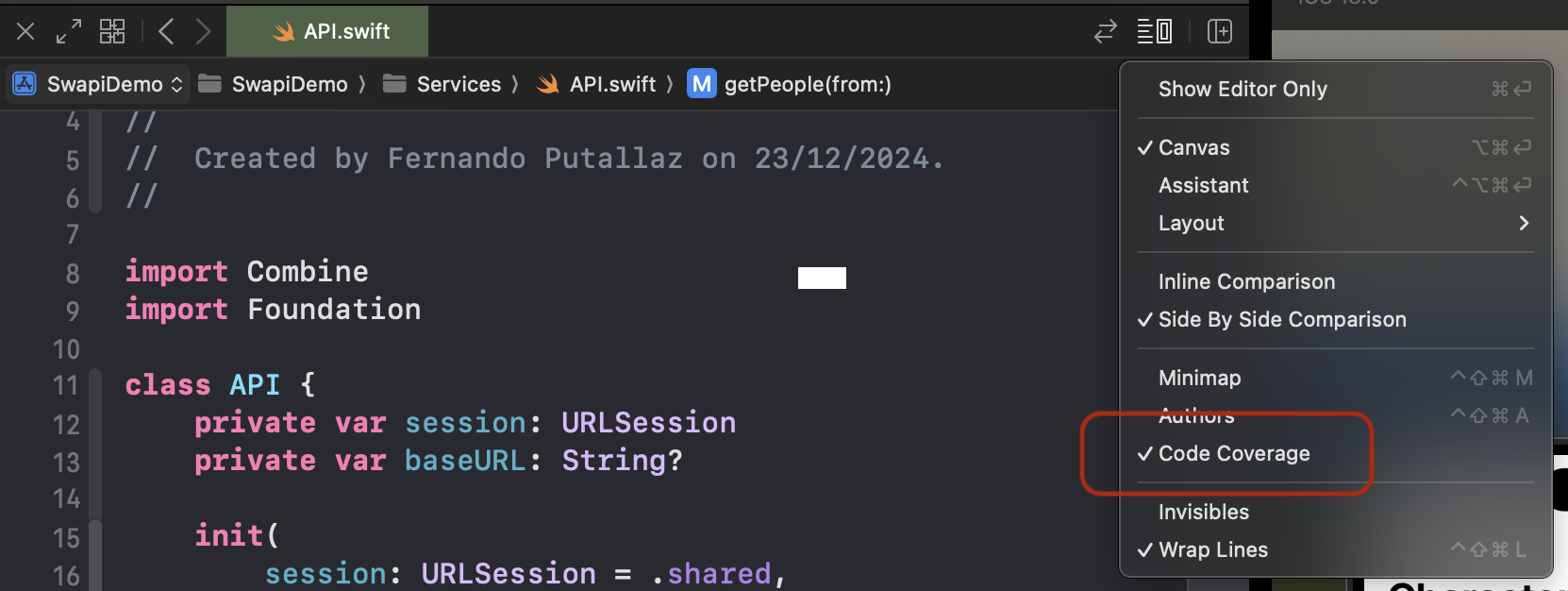
This allow us to see a little number on the right of our lines of code which means how it’s being exercised by our Test Suite.
Personally I found this pretty nice because it gives you the confidence that this code is backed up.
If in the future some co-worker or even you of course, try to change this implementation this green lines turns to red until you write the proper tests for it, I love it.
Visualize the coverage
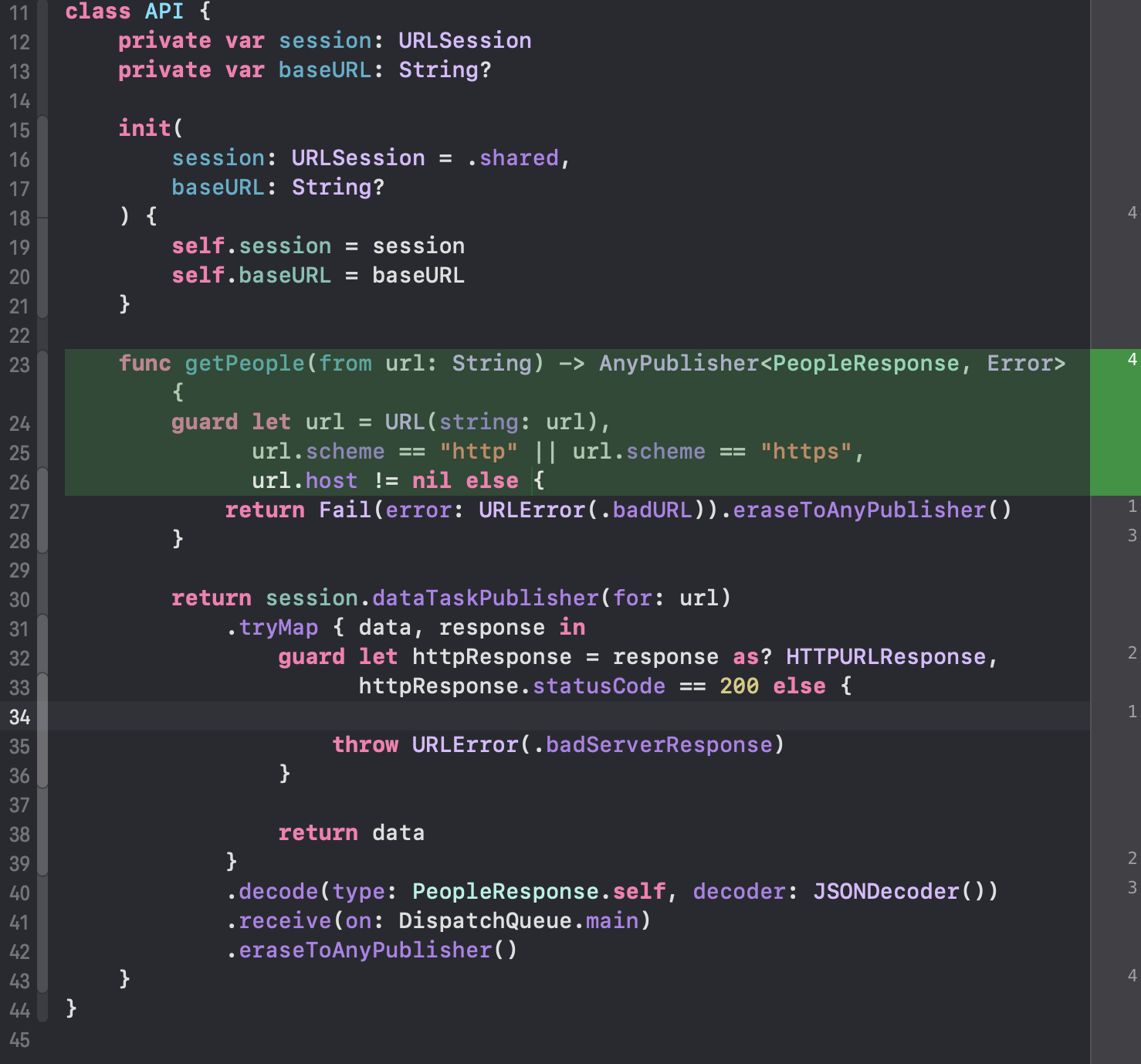
Since this is our only tested file also means that we still have many things to test!
But that is for upcoming posts. ✍️
Conclusion
Combine definetively it’s a tool that we must posses.
Using async/await it’s ok, but we’re leveraging a more advanced and professional way to handle network requests.
In subsequent posts we’ll keep leveraging the power of Combine.
Now we can merge this branch with our new implementation of Combine into our Main branch and start thinking on making this App better adding infinite scrolling, detail views and many more things.
See you in the next post!
Thanks for reading!
← All posts